Updated for 2026 with new minimum limits, seamless verification, and faster withdrawal flow!
Why Use GCash to Withdraw from Playtime Casino?
GCash remains the most trusted e-wallet option for Filipino players to cash out winnings fast, with:
- ✅ Zero withdrawal fees
- ✅ Real-time transfer (post-verification)
- ✅ Safe and seamless flow after KYC
- ✅ Now even faster with bound accounts!
What’s New in 2026?
| Requirement | 2025 | 2026 Update |
|---|---|---|
| Minimum Withdrawal | ₱20 | Now ₱50 minimum to withdraw |
| KYC Verification | Optional for small cash | Mandatory for all withdrawals |
| Process Speed | 3–10 mins, varied | Faster after account binding |
| Password Binding | Not required | Required to bind account securely |
Step-by-Step: How to Withdraw via GCash (2026)
Step 1: Login to Your Playtime Account
➡️ Go to playtime.ph or open the app.
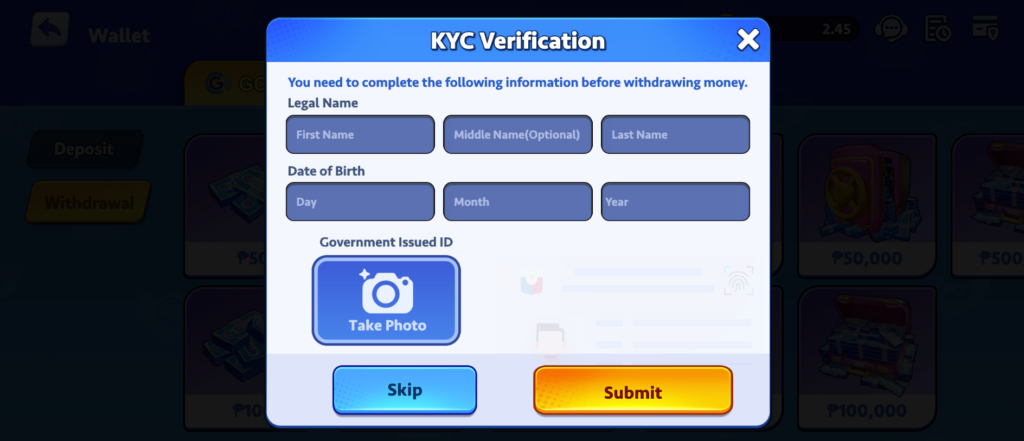
Step 2: Make Sure You Are KYC Verified
✔️ Upload valid ID
✔️ Submit selfie
✔️ Wait for approval (usually within 1–12 hours)
🛑 Without KYC, withdrawals will be blocked.
📌 Pro Tip: Do this early to avoid delays when you win big!
Step 3: Bind Your GCash Account
Once verified:
- Go to Wallet > Withdraw > GCash
- Enter your GCash number
- Set your withdrawal password (this secures your binding)
- Confirm via OTP
Step 4: Initiate Withdrawal
- Tap Withdraw
- Select GCash
- Input the amount (₱50 minimum)
- Confirm and enter your withdrawal password
✅ You’ll see a confirmation screen
⏱️ Processing usually takes 2–5 minutes
Common Questions
🔐 What is the withdrawal password?
It’s a personal PIN you create during binding. It adds security so nobody can withdraw from your account except you.
🧾 Is there a withdrawal limit?
It varies per user, but daily withdrawal caps are often tied to your VIP level. Higher tiers = higher limits.
📉 What if my withdrawal fails?
Check:
- KYC status
- Bound number matches GCash
- No system maintenance
- Daily limit not exceeded
If all else fails, contact Playtime Live Chat Support.
Tips to Speed Up Withdrawals
✅ Complete KYC early
✅ Use a verified GCash account (same name)
✅ Always use the same number you used during binding
✅ Avoid peak hours (1 AM – 3 AM can be slower)
Still New to Playtime?
Start winning & withdrawing today:
🔸 Register for a Free Account
🔸 Download Playtime App
🔸 Login to Withdraw Now